
Eugenius1.0 - Google Play
You'll be able to see results in few seconds.
Publisher Description
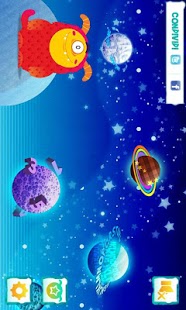
For all the children that feel hungry of knowledge, Eugenius, the greediest Monster of the Galaxy, is coming!
Learning is easy and funny with Eugenius: the odd, tender and “insatiable” Monster drives your babies to a fantastic voyage to discover the Knowlegde’s Galaxy!
Colorius, Alphabeta and Numberland are the planets where Eugenius has to return the knowledge, and where your babies learn colours, letters and numbers enjoying!
Colorius is the first planet, included into the app, that is ready to be won by your child that can enjoy with all the rainbow’s colours!
Eugenius needs you…and needs your tender cuddle!
Go on and get your baby screamingly funny, filling Eugenius of cuddles! Scramble him, tickle him and move him in a funny and crazy tribal dance on the moon!
The nice Monster drives your baby in different missions to discover wonderful knowledge’s Planets! At the end of each mission, on the space shuttle, children have a fantastic medal as award, that you can send by e-mail, print, paint and cut together with your baby!
And if you want to show to all your friends how much planets and medals you with your child have won..share them on your page of Facebook and Twitter!
The app is:
- Multiple language, english/italian, to can attend your baby in the first steps toward the italian learning
- for the launch, free Download with the Colorius planet ready to be played. Ready to be downloaded in app purchase are two wonderful planets: Alphabeta and Numberland!
Are you on the Terrestrial Planet again?
What are you waiting for! Take the Eugenius’s spaceship, go on MagMag with your baby and help the funny Monster to return the knowledge on your Planet!
I’m already here, and you? Play with me…Magheiuuuu!!!
About Eugenius
The company that develops Eugenius is Mondadori. The latest version released by its developer is 1.0.
To install Eugenius on your Android device, just click the green Continue To App button above to start the installation process. The app is listed on our website since 2012-11-27 and was downloaded 0 times. We have already checked if the download link is safe, however for your own protection we recommend that you scan the downloaded app with your antivirus. Your antivirus may detect the Eugenius as malware as malware if the download link to com.handcraftedsoftware.wikimonster is broken.
How to install Eugenius on your Android device:
- Click on the Continue To App button on our website. This will redirect you to Google Play.
- Once the Eugenius is shown in the Google Play listing of your Android device, you can start its download and installation. Tap on the Install button located below the search bar and to the right of the app icon.
- A pop-up window with the permissions required by Eugenius will be shown. Click on Accept to continue the process.
- Eugenius will be downloaded onto your device, displaying a progress. Once the download completes, the installation will start and you'll get a notification after the installation is finished.
Program Details
System requirements
Download information
Pricing
Version History
version 1.0
posted on 2012-11-27
Several fixes and updates
version 1.0
posted on 2012-11-27
Disclaimer
Official Google Play Link
We do not host Eugenius on our servers. We did not scan it for viruses, adware, spyware or other type of malware. This app is hosted by Google and passed their terms and conditions to be listed there. We recommend caution when installing it.
The Google Play link for Eugenius is provided to you by apps112.com without any warranties, representations or guarantees of any kind, so access it at your own risk.
If you have questions regarding this particular app contact the publisher directly. For questions about the functionalities of apps112.com contact us.
